Starting a new goal always feels exciting. Fresh shoes, renewed energy, big ambitions.
But real life hits fast. Stress, long days, missed sessions. And suddenly, it’s Quitters Day again.
We’ve been there.
Most apps count streaks and punish “bad” days. That doesn’t help. So we built something different.
FitWoody listens and adjusts to how you feel today. Sleep, heart rate, energy… It reads what your body actually needs.
Some days it cheers you on. Others, it simply says: you did enough. This isn’t about perfection. It’s about showing up, even if it’s just 5 minutes.
That’s why FitWoody exists.
Not to chase perfection, but to help you build habits that actually stick. One small, smart, human step at a time.
Everything your body tells you, turned into today’s plan.
Most fitness apps count what you did. FitWoody reads how you are: how you slept, how your heart is recovering and how much you’ve trained lately. Then it decides what today should look like, and tells you why.
Health analysis
All your signals, read as one.
Sleep, heart rate, HRV, workouts, steps and weight. FitWoody brings together everything Apple Health knows about you and works out where you’re starting from, before it sets a single goal.
?
?
?
?
?
?
?
?
Analyzing…
132/500 kcal
Sleep Deficit2h 30min
Bad HRV23.1 ms
Adaptive goals
Sometimes push a little more. Others, rest without guilt.
Every morning FitWoody looks at how you slept, your HRV and your recent training, and moves today’s goal to fit. When it asks for less, it tells you why.
FitWoody Insights
Plus
Your regular goal is 500 kcal, but based on today’s data we’ve adapted it to 330 kcal. Check the metrics to see why.
Knowhowyoureallyslept.
Every night becomes something you can read: how long, how deep, how regular, and what it did for your recovery.
Sleep that explains itself.
Every morning a plain-language report reads your night: regularity, quality and duration, how much restorative sleep you got, and what your sleep bank still owes.
Read before your first coffee. The moment you wake up, FitWoody has already read your night and tells you what shaped it.
Every stage of the night. Awake, REM, core and deep, minute by minute, with one score that sums up how it went.
Good Sleep
7h 40m asleep
82
Awake
REM
Core
Deep
11:32 PM8:15 AM
Trainbyhowitfelt.
Effort, load and freshness in one place, so you know when to push and when a lighter day is the smarter one.
Tell it how hard it felt.
Rate a workout with one gesture and see, right away, how much it adds to your load and where it leaves you for tomorrow.
Your load, in context. Fitness, fatigue and freshness over the last six weeks, and what today’s session does to them.
Training load
Stable+9%
16.3ATL
Yesterday
6 weeks agoToday
Fitness level
15Building
Every route, with what it did for you. Maps, heart rate zones and a FitWoody Insight on how the session fits your recovery.
Goalsthatkeepupwithyou.
FitWoody suggests goals from your history, adapts them to the day you’re having and celebrates when you get there.
Goals that start from your history.
FitWoody looks at your last months and suggests goals you can actually reach, or lets you build your own. And when you get there, it celebrates.
Statistics that tell a story. Your peak days, how balanced your week is and which activities carry your goal, month after month.
Progress that survives a bad week. Weekly streaks and how far ahead you are, so one missed day never undoes the rest.
Streak
7weeks
Longest streak
Progress
Ahead
+6
MTWTFSS
Yourwholeathletichistory.
Heart, breathing, weight and years of workouts, in a passport you can scroll back through.
Your FitPassport.
Every year of training in one profile: VO₂ max, the kind of training you do, weight and how steady your sleep is, each one explained in plain words.
FITWOODY PLUS HEALTH PASSPORT
Name
FitWoody User
Workouts
39
Duration
27h 5m
25.8VO₂max
Below Average
Your breathing quickens earlier than normal during moderate effort.
On and off rhythm
Short-burst effort
Focused training
Aerobic focus
Low activity
84.5kg
Overweight
You’re slightly above your ideal weight, but within a stable range.
Consistent
15:0020:0001:0006:00
You maintain a reliable sleep schedule that supports your health goals.
Scroll back through the years. Switch to the last 12 months or any past year and watch your fitness, weight and sleep change with you.
HRV, finally explained. Each night against your own usual range, so you know whether today’s number is good news for you.
HRV · Today
34ms
Positive trend ↗
Wherever you already are.
Siri, Spotlight, Shortcuts, widgets, Apple Watch and a native Mac app. FitWoody fits into the way you already use your devices, with one subscription for all of them.
Just ask Siri. Ask how you slept and hear the answer. Tell Siri your weight or your blood pressure and a small card appears right in the conversation, ready to adjust before it saves. The thinking happens on your iPhone.
How did I sleep in FitWoody
Sleep7 hr, 40 min
☾ 23:322:054:38☀︎ 07:12
FitWoody
Running your Shortcut
Ask Siri…
A Mac app of its own.
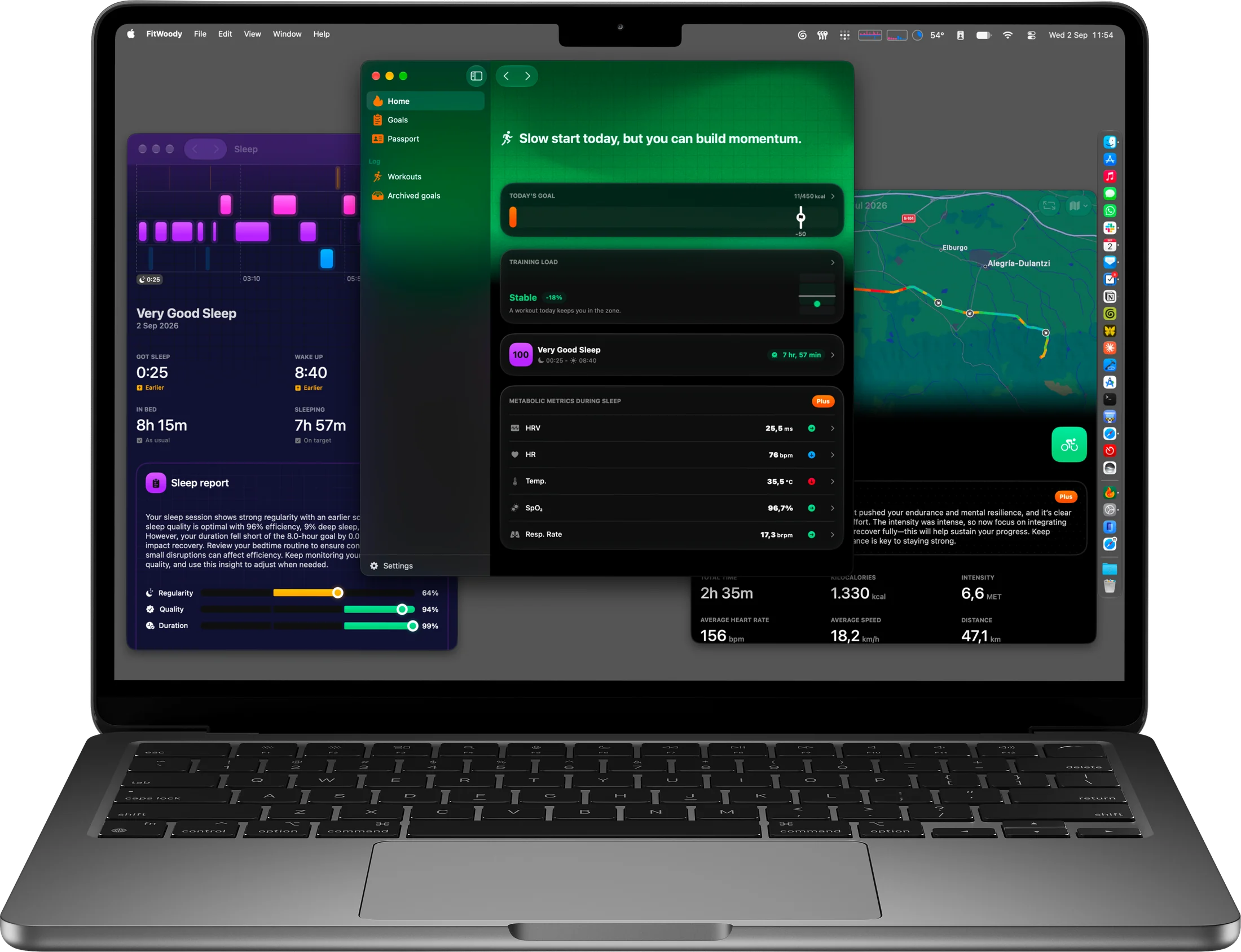
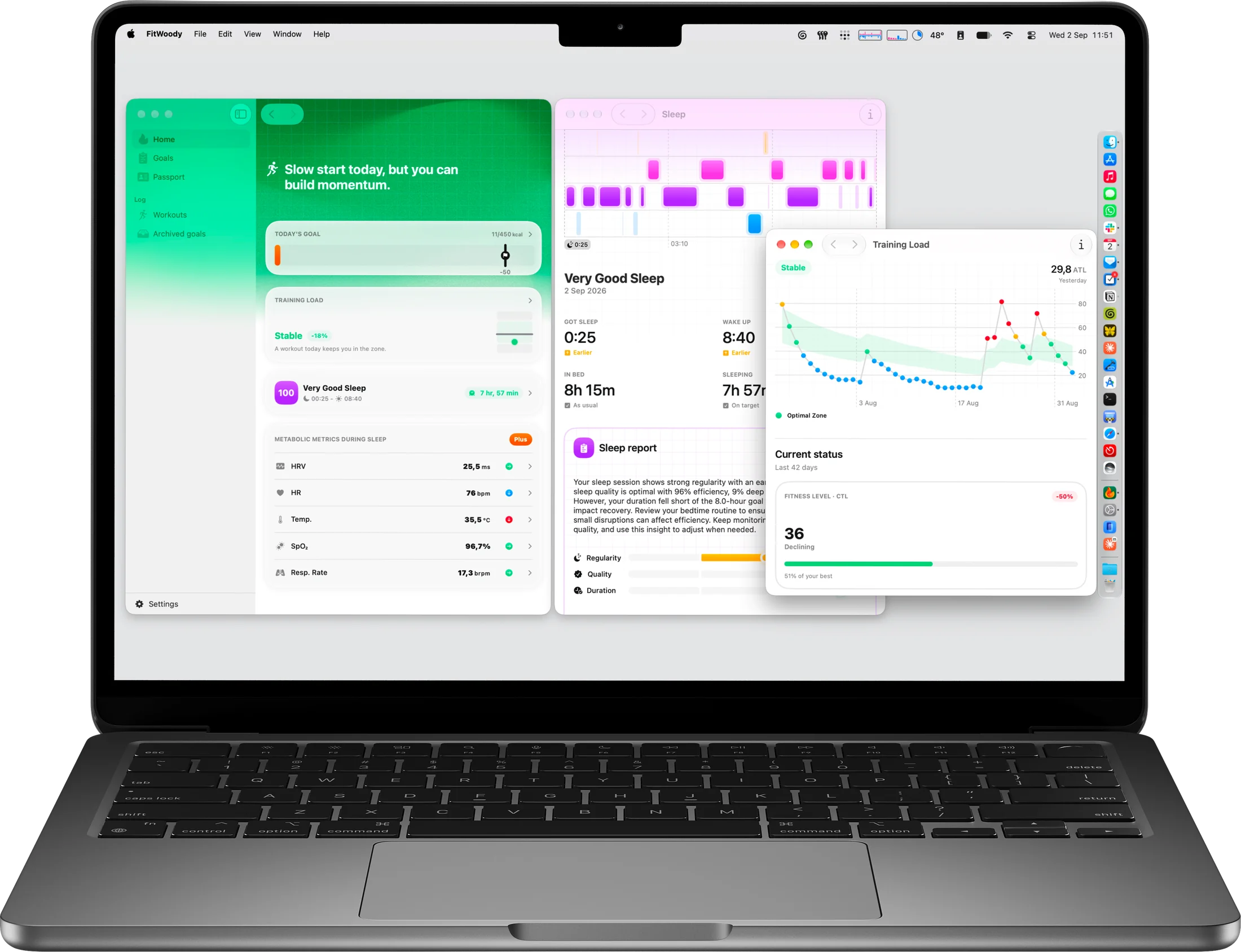
Native, with everything the iPhone app does. Open last night’s sleep in one window and this week’s training load in another. Menu bar, keyboard shortcuts, desktop widgets and Handoff, all included in your subscription.
Right in Spotlight. Your workouts, nights and health readings show up next to your messages and photos. Type what you’re looking for and it’s there.
Spotlight Search
FitWoody
Very Good SleepWednesday, 2 Sep7 hr, 57 min
Good SleepTuesday, 1 Sep7 hr, 12 min
Sleep scheduleLast 3 weeksConsistent
Your data, your way. Ask Shortcuts for runs over 10 km sorted by date, or the nights you slept longest. Views we never designed, because you don’t need us to.
Long runs
Find Workoutswhere Distanceis greater than 10 km
Sort by DateLatest First
Show Workouts
RunningMon, 14 Sep10.4 km
RunningFri, 11 Sep12.1 km
CyclingWed, 22 Jul47.1 km
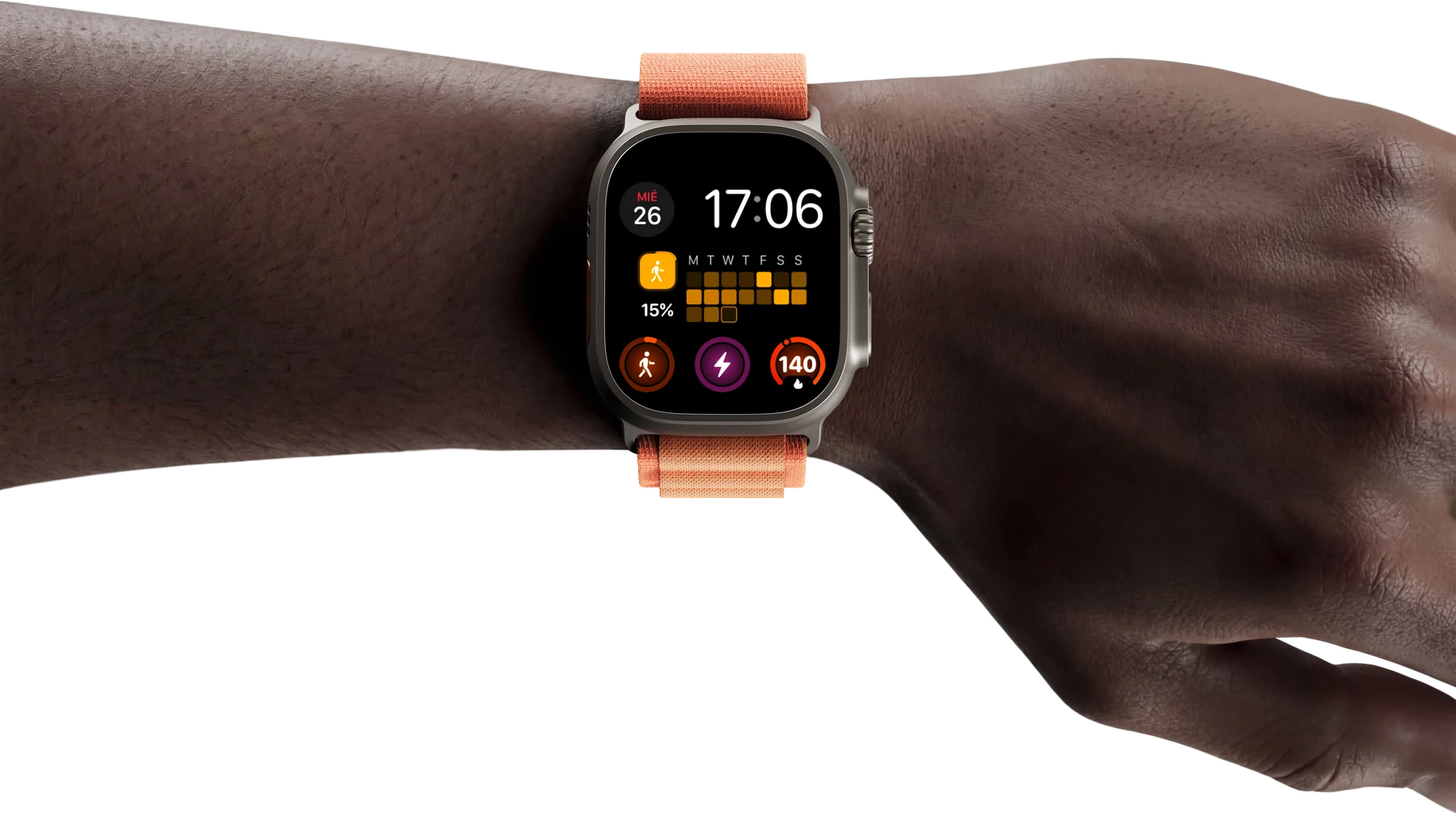
On your wrist. Track workouts on Apple Watch and keep your goals and streaks on the watch face, a glance away.
iPad, in many windows. FitWoody multitasks like the rest of your iPad, with windows, keyboard shortcuts and a menu bar. Every screen adapts to the space it’s given.
Youshouldn’thavetogolooking.
Free to start. Plus adds the night metrics, the reports and the passport, on iPhone, Apple Watch, iPad and Mac with a single subscription.
4.5 out of 5 on the App Store, from more than 700 ratings.
AApp StoreEditorial
What we love
FitWoody takes a holistic view of health. On top of tracking your workouts, it follows how well you rest and suggests challenges designed to improve how you feel.
kontrolDevSpain
A must if you have an Apple Watch
I’ve been using this app since it launched and I’ve seen the great work the Chubby team has done and how it keeps evolving. For me it’s essential whether you have an Apple Watch or not: it gives you metrics others don’t.
AlapueeesSpain
Fantastic
Not everyone who works out is an elite athlete. It’s great to see an app that’s both beautifully designed and precise in tracking data. Congratulations.
NachoCerratoSpain
Essential
It replaced Athlytic, and I think that says it all. A fantastic app made in Spain. Happy to pay the subscription and to watch it get better every day.
GuilleGCSpain
Great
I love this app and how it encourages you to keep fit and healthy, and how it lowers the daily targets if it detects that you are out of energy for any reason.
PPedro Aznar@pedroaznar
It connects with a shared tiredness
It feels like it speaks to a shared tiredness, against tools that turn every metric into an obligation.
SSt.StasaCyprus
Nice one. Simplified complex concepts
Help me a lot with consistency in training.
AApp StoreEditorial
What we love
FitWoody takes a holistic view of health. On top of tracking your workouts, it follows how well you rest and suggests challenges designed to improve how you feel.
kontrolDevSpain
A must if you have an Apple Watch
I’ve been using this app since it launched and I’ve seen the great work the Chubby team has done and how it keeps evolving. For me it’s essential whether you have an Apple Watch or not: it gives you metrics others don’t.
AlapueeesSpain
Fantastic
Not everyone who works out is an elite athlete. It’s great to see an app that’s both beautifully designed and precise in tracking data. Congratulations.
NachoCerratoSpain
Essential
It replaced Athlytic, and I think that says it all. A fantastic app made in Spain. Happy to pay the subscription and to watch it get better every day.
GuilleGCSpain
Great
I love this app and how it encourages you to keep fit and healthy, and how it lowers the daily targets if it detects that you are out of energy for any reason.
PPedro Aznar@pedroaznar
It connects with a shared tiredness
It feels like it speaks to a shared tiredness, against tools that turn every metric into an obligation.
SSt.StasaCyprus
Nice one. Simplified complex concepts
Help me a lot with consistency in training.
aruizoSpain
A necessary companion for health data
This app is completely necessary to understand, in a simple way, the health numbers our devices collect, above all for those of us who are not experts. The developers are on top of it, improving it day by day and listening to users. 10 out of 10.
NictumSpain
It’s become part of my daily routine
By far the smartest and easiest app to understand data. It quickly became part of my daily routine, I’ve been using it since summer, and I’m staying loyal. A true gem.
Morga353Spain
Beyond expectations
What a change, both the interface and the features, including the passport with its watermark. I love it. You can tell there is a lot of work and a lot of care in this app. Top 10.
VVictor Abarca@victorabarca
I wanted it in my latest video
After watching the progress the FitWoody team has made over several years, I really wanted to feature this app in my latest video. Top marks.
TrizioItaly
Personalised goals
Our body feels everything that happens to it: our sleep, the activity of the days before. Thanks to FitWoody you get an activity goal that takes all of that into account. The analyses are fascinating: sleep, heart rate variability, body temperature, blood oxygen and breathing rate.
Pavel ZRussia
The app is incredible
Everything about it is great: the app is worth every cent, and it gets the most out of the watch.
Angel PahnUnited States
Love this app
Since I’ve started using this application I’ve noticed a drastic change in my overall health and life. This app has helped me keep track of an exercise routine that works.
aruizoSpain
A necessary companion for health data
This app is completely necessary to understand, in a simple way, the health numbers our devices collect, above all for those of us who are not experts. The developers are on top of it, improving it day by day and listening to users. 10 out of 10.
NictumSpain
It’s become part of my daily routine
By far the smartest and easiest app to understand data. It quickly became part of my daily routine, I’ve been using it since summer, and I’m staying loyal. A true gem.
Morga353Spain
Beyond expectations
What a change, both the interface and the features, including the passport with its watermark. I love it. You can tell there is a lot of work and a lot of care in this app. Top 10.
VVictor Abarca@victorabarca
I wanted it in my latest video
After watching the progress the FitWoody team has made over several years, I really wanted to feature this app in my latest video. Top marks.
TrizioItaly
Personalised goals
Our body feels everything that happens to it: our sleep, the activity of the days before. Thanks to FitWoody you get an activity goal that takes all of that into account. The analyses are fascinating: sleep, heart rate variability, body temperature, blood oxygen and breathing rate.
Pavel ZRussia
The app is incredible
Everything about it is great: the app is worth every cent, and it gets the most out of the watch.
Angel PahnUnited States
Love this app
Since I’ve started using this application I’ve noticed a drastic change in my overall health and life. This app has helped me keep track of an exercise routine that works.
A quick word on cookies
We would like to measure how this site is used, with Google Analytics. Nothing is stored until you accept, and you can change your mind any time. Cookie policy.