







How to use FitWoody
Table of Content
Apple Watch complications
Complications are small widgets that live on your Apple Watch face.
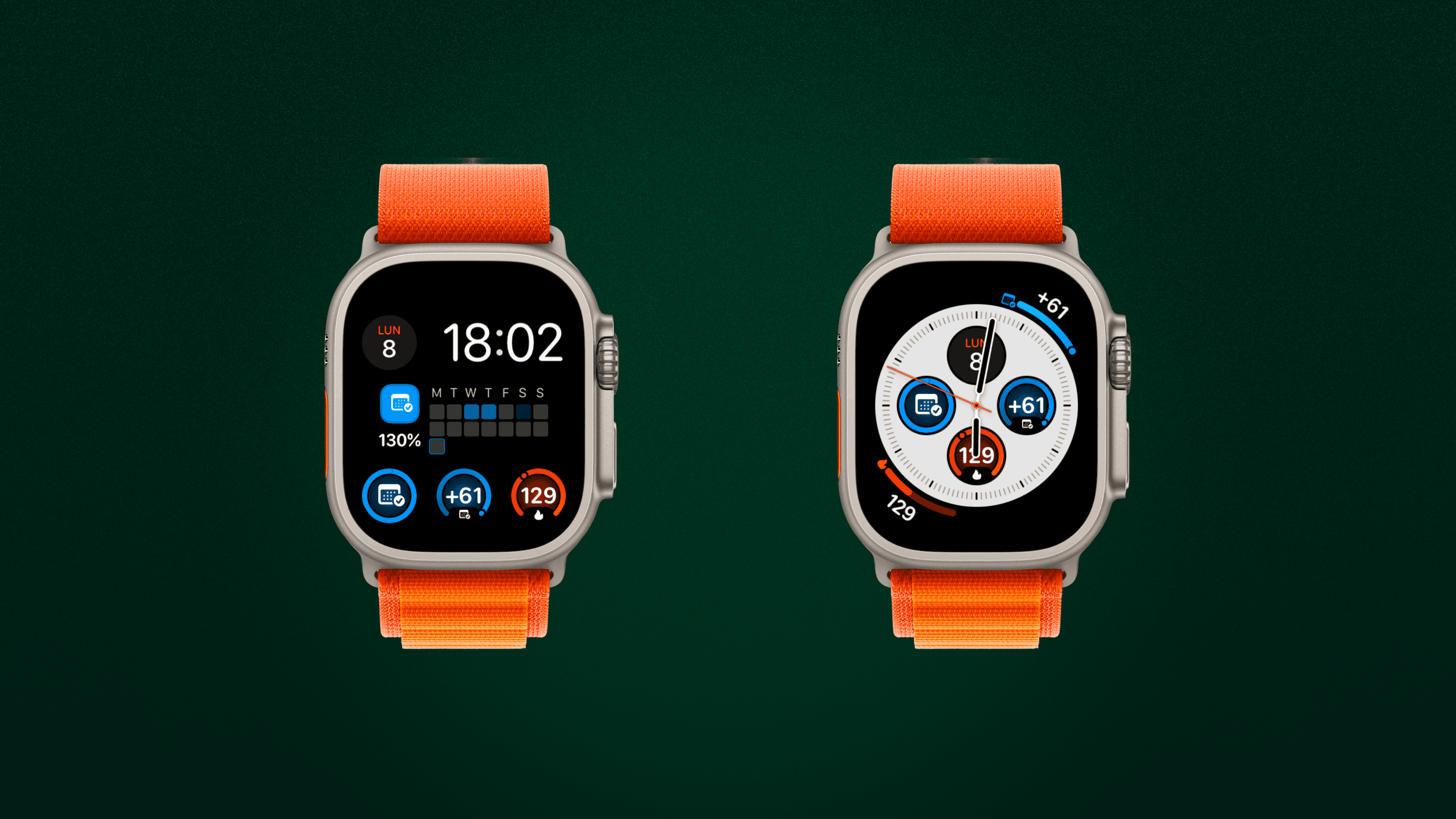
What are Apple Watch complications?
Complications are small widgets that live on your Apple Watch face.
They let you see key stats instantly, without opening the app.
FitWoody includes several complications so you can stay connected to your day and your long-term goals, at a glance.
Which FitWoody complications are available?
FitWoody supports the most popular complication types across many watch faces.
Circular complications
Small, round widgets ideal for quick stats like:
– Active kilocalories
– Your streak (how many days in a row you’ve shown up)
– Whether you’re ahead or behind your long-term plan
Corner complications
These sit on the edges of the watch face.
They display your annual exercise goal and adopt the exact color of your goal for easy recognition.
They show:
– Your streak (how many days in a row you’ve shown up)
– Whether you’re ahead or behind your long-term plan
– Your completion blocks, one square per week/day depending on your goal type
Curved bar complications (curved gauges)
These curved gauges visualize your annual goal progress with a smooth arc, using the same color you selected for your goal.
Rectangular widgets
These appear when you scroll down on your Apple Watch Home screen.
FitWoody offers a rectangular widget that gives you a larger, more detailed view of your day, including:
– Your active calories
– Your goal progress
It’s the quickest way to see everything you need at a glance, without opening the app.
What information can I see at a glance?
Depending on the complication you choose, you’ll see:
Daily movement & active calories
Daily activity goal progress
Annual exercise goal progress
Your streak
Whether you’re ahead or behind your plan
Completion squares representing each milestone
How do I add a FitWoody complication to my Apple Watch face?
Touch and hold your Watch face
Tap Edit
Swipe to Complications
Tap a slot and select FitWoody
Choose the complication you prefer
Press the Digital Crown to save
Your progress, always just a glance away.
Some of these complications are part of FitWoody Plus.
To unlock the full set, including the advanced annual goal complications, you’ll need an active FitWoody Plus subscription.
What are Apple Watch complications?
Complications are small widgets that live on your Apple Watch face.
They let you see key stats instantly, without opening the app.
FitWoody includes several complications so you can stay connected to your day and your long-term goals, at a glance.
Which FitWoody complications are available?
FitWoody supports the most popular complication types across many watch faces.
Circular complications
Small, round widgets ideal for quick stats like:
– Active kilocalories
– Your streak (how many days in a row you’ve shown up)
– Whether you’re ahead or behind your long-term plan
Corner complications
These sit on the edges of the watch face.
They display your annual exercise goal and adopt the exact color of your goal for easy recognition.
They show:
– Your streak (how many days in a row you’ve shown up)
– Whether you’re ahead or behind your long-term plan
– Your completion blocks, one square per week/day depending on your goal type
Curved bar complications (curved gauges)
These curved gauges visualize your annual goal progress with a smooth arc, using the same color you selected for your goal.
Rectangular widgets
These appear when you scroll down on your Apple Watch Home screen.
FitWoody offers a rectangular widget that gives you a larger, more detailed view of your day, including:
– Your active calories
– Your goal progress
It’s the quickest way to see everything you need at a glance, without opening the app.
What information can I see at a glance?
Depending on the complication you choose, you’ll see:
Daily movement & active calories
Daily activity goal progress
Annual exercise goal progress
Your streak
Whether you’re ahead or behind your plan
Completion squares representing each milestone
How do I add a FitWoody complication to my Apple Watch face?
Touch and hold your Watch face
Tap Edit
Swipe to Complications
Tap a slot and select FitWoody
Choose the complication you prefer
Press the Digital Crown to save
Your progress, always just a glance away.
Some of these complications are part of FitWoody Plus.
To unlock the full set, including the advanced annual goal complications, you’ll need an active FitWoody Plus subscription.